Using the Chances Command
The /chances command allows you to customize the probability weights for different sources when using /random all. This gives you control over which types of content are more likely to appear.
Getting Started
To open the chances menu, simply use:
/chances
The Chances Interface
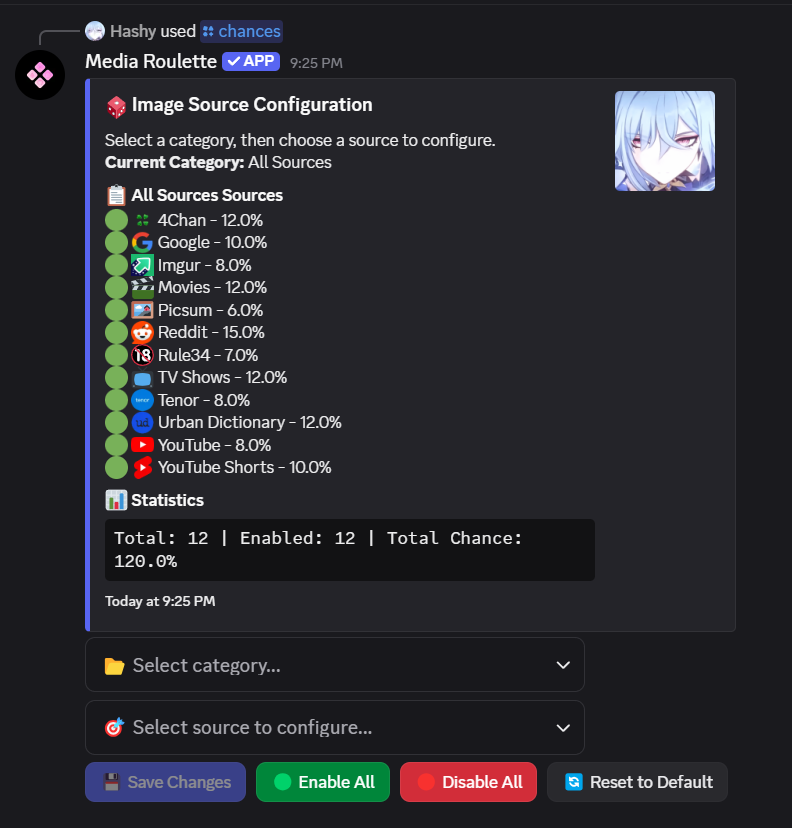
This is how the chances menu looks like. The interface consists of several components that work together to help you customize your content preferences.
How to Use the Menu
Step 1: Select a Category
The first select menu is for choosing a category. This helps organize the various content sources into logical groups, making it easier to find and manage specific types of content.
Step 2: Pick a Source
The second select menu is for picking the specific source within your chosen category. Once you select a category, this menu will populate with all available sources in that category. If no category is selected then a maximum of 25 sources are shown in the menu (Discord limit).
Step 3: Modify Source Settings
After selecting a source, you have two options:
- Toggle: Enable or disable the source completely
- Change Percentage: Adjust the probability weight (percentage chance) for this source
Step 4: Save Your Changes ⚠️
After every change you make, you MUST click the "Save Changes" button. Your modifications will not take effect until you save them.
Quick Actions
For convenience, the interface also includes:
- Disable All: Quickly disable all sources with one click
- Enable All: Re-enable all sources for general use
These buttons are particularly useful when you want to start fresh or quickly reset your preferences.
You can click "Reset to Default" to reset all chances back to their default percentages. This is useful if you want to start over with the original probability weights.
Tips
- Make sure to save after each modification
- Use the category system to efficiently navigate to the sources you want to modify
- The percentage changes affect how likely each source is to be selected when using
/random all - You can completely disable sources you don't want to see by toggling them off
- You may share your config by using
/settings shareconfig <title> <description>, which includes dictionary assignments and chances.
Remember: Your changes only take effect after clicking "Save Changes"!